Web Sockets
Web Sockets enable two-way communication between a client running untrusted code to a remote host that has opted-in to communications from that code.
The basic protocol consists of message framing with TCP transport.
The basic idea is to have two-way communication between servers and browsers without opening multiple HTTP connections
For reference, the following RFC contains the corresponding web socket protocol RFC 6455.
The Problem
Applications requiring bidirectional communication have historically had a high-overhead by abusing HTTP connections and polling servers for updates and sending notifications as distinct HTTP requests.
The solution is to create a protocol that allows for traffic in both directions without requiring several requests.
The result is a nearly real-time interaction between client and server via message passing.
The Protocol (Simplified)
The client initiates the handshake by creating an "Upgrade" request to the server.
The server responds by opening the connection or rejecting with a response.
Bidirectional messages may then be passed between client and server until the connection is closed at any time by either side.
The following arrow diagram illustrates the connection process:
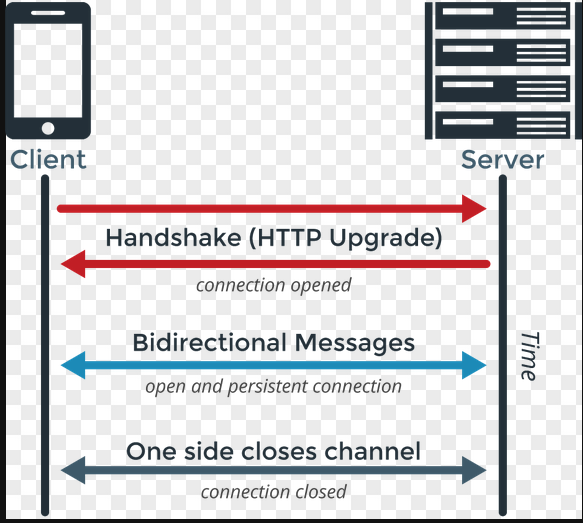
Client/Server Connections
Client Code
The following client code below provides an example of how to setup a basic connection with a web socket server (provided in Go below).
The following javascript implementation is a simplified version using an immediately invoked function, but the principles remain the same:
Setting up Client Connection
First, create a WebSocket using the browser API as follows:
const conn = new WebSocket("ws://localhost/ws")
This provides you with a connection object to be used subsequently when defining the event handler functions.
The most basic required handlers are as follows:
conn.onopen = () => {
    console.log("Connection opened!")
}

conn.onclose = () => {
    console.log("Connection closed!")
}

conn.onmessage = () => {
	conn.send(JSON.stringify("{msg: \"stuff!\"}"))
}
Once these are setup, you can then define whatever message schema suits your needs for passing messages.
In this example application, I simply use a JSON object with a key of msg and a string value.
Setting up the Server Connection
The backend server connection requires only a minute amount of forethought to setup, but ultimately also results in a rather simple implementation.
The basic idea is to create an HTTP server used to listen for HTTP requests from the client. You provide a reader and writer pair of go routines that listen for messages from the client. The reader then may send the message to be processed by the writer and then sent to the client.
In a non-trivial application, this reader might be listening for changes on a file system, and then the writer then reads a file and sends the file data back to the client.
For this simple example, we periodically send a message to the client every second. The reader only reads messages from the client and logs them to the console.
The following reader implementation simply reads messages from the client, and then logs the messages to the console.
func ws_reader(ws *websocket.Conn) {
	for {
		_, buffer, err := ws.ReadMessage()
		if err != nil {
			log.Printf("Error reading message: %s", err)
			break
		}

		var msg Message
		json.Unmarshal(buffer, &Message{})
		switch message.msg {
			case "stuff!":
				fmt.Println("Got stuff!")
				break
			default:
				return
		}
	}
}
The writer implementation sets up a periodic ticker in Go that is used to write a new message every second.
func ws_writer(ws *websocket.Conn) {
	ticker := time.NewTicker(time.Second)
	defer func() {
		ticker.Stop()
	}()

	// send message every second
	for {
		select {
		case ticker.C:
			if buf != nil {
				err := ws.SetWriteDeadline(time.Now().Add(write_wait))
				if err != nil {
					log.Printf("Error setting write limit %s", err)
					return
				}

				err = ws.WriteMessage(websocket.TextMessage, []byte("Woohoo!"))
				if err != nil {
					log.Printf("Error writing message: %s", err)
					return
				}
			}
		}
	}
}
Conclusion
This post discusses the basic implementation from a client/server perspective for setting up a trivial web socket implementation.
Although the basic example is simplified, this may be generalized for further more complicated examples where the reader and writer may process information through channel inter-communication.
Overall, web sockets provide a powerful and easy-to-use alternative to HTTP communication when the requirements are real-time communication between client and server.
Complete Client and Server Code
Client Code
(() => {
    const logs = document.getElementById("logs")
    const conn = new WebSocket("ws://localhost/ws")
    const search = document.getElementById("search")

    conn.onopen = () => {
        console.log("Connection opened!")
    }

    conn.onclose = () => {
        console.log("Connection closed!")
    }

	conn.onmessage = () => {
		conn.send(JSON.stringify("{msg: \"stuff!\"}"))
	}
})()
Server Code
func main() {
	http.HandleFunc("/ws", handler)
	log.Fatal(http.ListenAndServe("localhost:8080", nil))
}

func handler(w http.ResponseWriter, r *http.Request) {
	conn, err := upgrader.Upgrade(w, r, nil)

	if err != nil {
		log.Fatalf("Error upgrading to ws connection: %s", err)
	}

	defer func() {
		conn.Close()
	}()

	go ws_writer(conn)
	ws_reader(conn)
}

type Message struct {
	msg string
}

func ws_reader(ws *websocket.Conn, search_chan *chan string) {
	for {
		_, buffer, err := ws.ReadMessage()
		if err != nil {
			log.Printf("Error reading message: %s", err)
			break
		}

		var msg Message
		json.Unmarshal(buffer, &Message{})
		switch message.msg {
			case "stuff!":
				fmt.Println("Got stuff!")
				break
			default:
				return
		}
	}
}

...

func ws_writer(ws *websocket.Conn) {
	ticker := time.NewTicker(time.Second)
	defer func() {
		ticker.Stop()
	}()

	// send message every second
	for {
		select {
		case ticker.C:
			if buf != nil {
				err := ws.SetWriteDeadline(time.Now().Add(write_wait))
				if err != nil {
					log.Printf("Error setting write limit %s", err)
					return
				}

				err = ws.WriteMessage(websocket.TextMessage, []byte("Woohoo!"))
				if err != nil {
					log.Printf("Error writing message: %s", err)
					return
				}
			}
		}
	}
}